-
Production planning
/
30. April 2024
Production Scheduling Software: 9 must-haves for a flawless workflow
-

-
From the rise of customised goods to the volatility of sourcing and a talent gap, manufacturers are facing unprecedented challenges. Fortunately, modern Production Scheduling Software empowers businesses to navigate these complexities toward an agile and customer-oriented production. This article delves into the functionalities of such software and the key considerations for a successful implementation, ensuring you stay ahead of the curve in this dynamic market.
Production scheduling, a cornerstone of production management, plans and allocates resources such as orders, machines, and labour within the production process. Production Scheduling Software steps in to elevate this crucial function. Its primary objective is to maximise efficiency and productivity by minimising bottlenecks, shortening throughput times, and optimising production targets. This optimisation is achieved by factoring in critical elements during its calculations. These elements include factors like capacity utilisation, material and personnel availability, machine and workstation constraints, set-up times, and even delivery deadlines.
A Production Scheduling Software generates optimized actionable production plans based on defined target criteria.
Differentiation between a Production Scheduling Software and Scheduling Boards
Production Scheduling Software such as GANTTPLAN and scheduling boards are two different approaches to planning and controlling production processes. While Production Scheduling Software leverages advanced computing using complex algorithms and optimisation techniques to create detailed production schedules, scheduling boards are often physical boards or whiteboards that are used purely to visualise and communicate production plans.
Accordingly, digital production scheduling differs from a simple scheduling board in the following ways:
- Production Scheduling is automatic: Modern Production Scheduling Software allows data to be automatically extracted from a master system (usually an ERP system) and the shop floor (usually an MES or MOM system), scheduled, and automatically written back to the peripheral systems – production schedules to the ERP system and occupancy schedules to the MES or MOM system.
- Production Scheduling is central: The modern production scheduling philosophy differs from an isolated view on the production planning & scheduling processes, where tactical planning and operational scheduling follow a decentralised top-down (even down to shop floor level) optimisation process. Modern Production Scheduling Software bundles these competences to create integrated production and utilisation schemes.
- Production Scheduling is close to real time: The primary goal of Production Scheduling Software is to dynamically manage the ordering, production, storage and delivery process. In other words, modern Production Scheduling prioritises action over reaction. This is achieved by responding quickly to complex disruptions and influences and adapting the schedule accordingly.
- Production Scheduling is optimised: Traditional, Excel-based planning solutions crumble under the weight of complex optimisations. Modern Production Scheduling Software steps up, offering the ability to holistically optimise planning and scheduling across a range of target criteria.
- Production Scheduling is collaborative and location-independent: Modern Production Scheduling Software thrives on collaboration. This means a web-based solution is key, accessible from any device and platform through a simple web browser. This ensures scheduling security for everyone, whether they are in the office or working remotely from home.

GANTTPLAN Web: Visualisation of the planning situation at workstation level Keeping the line moving: The role of production scheduling in overcoming machine downtimes
When machines go offline, modern Production Scheduling Software seamlessly integrates backup options from the work plan, as long as all systems and machines and their availabilities have been adequately maintained in the system. It factors in differences such as speed, staffing needs, and variable costs to optimise the new schedule. In addition, the software can identify non-critical orders that can wait for the original machine to be repaired.
Streamline production despite downtime: Production Scheduling Tools offer a powerful toolkit for managing unexpected machine issues:
- Integrated Downtime Management: Temporary storage of downtimes of the defective machine
- Adapting to Reduced Capacity: It factors in slower speeds of backup machines, ensuring realistic scheduling.
- The Right Machine, Right Away: It automatically considers machine-specific constraints (such as operator skill sets) for compatibility with alternative machines.
- Tools at the Ready: It routinely ensures the availability of the necessary tools for alternative machines, avoiding delays.
- Delivery Under Control: It provides immediate visibility of critical delivery dates and suggests alternative completion times, keeping customers informed.
Beware the staffing gap: Production scheduling needs people power
While scheduling production without personnel planning is technically possible, it’s not ideal. The key question is when to plan for staffing: before or after production requirements have been determined. Both approaches have advantages and disadvantages, depending on the specifics of your business. In most cases, worforce planning comes first (upstream). This treats staff as a crucial resource and potential bottleneck, allowing production scheduling to adjust around their availability.
Four Pillars of Effective Personnel Planning in Production Scheduling:
- Flexible Shift Planning: Account for planned and unplanned absences through flexible scheduling with exceptions. This ensures smooth operations even with unforeseen staffing changes.
- Skills-Based Allocation: Match employee qualifications with work centre needs and required skills (work plan or process-related). This guarantees the right people are assigned to the right tasks.
- Employee Group Planning: Plan for large pools of employees by grouping them based on skill sets. This provides greater flexibility in allocating staff across tasks.
- Cost-Conscious Scheduling: Factor in variations in employee costs (influence varies depending on which target criteria have been prioritised) when optimising production schedules. This helps to minimise overall production costs.
GANTTPLAN: Production Scheduling Software using qualification matrices to create realistic production plans More than just machines: Why every production resource and tool matters for scheduling
While their importance varies by company and industry, production resources and tools (PRTs) play a critical role in accurate production scheduling. Tools, a key category of PRTs, can range from basic assembly tools to specialised equipment such as CNC machine turrets or injection moulding tool sets*.
Ignoring PRT constraints can lead to scheduling chaos. Imagine assigning a sequence or allocating tasks to a workstation that can’t be completed because the required tools are already in use elsewhere. In the worst-case scenario, the entire production schedule falls apart.
Fine-Tune your schedule: The power of accurate PRT (Production Resources & Tools) maintenance
Accurate maintenance in your scheduling tool unlocks the true potential of your PRTs. By keeping information about tool limitations and capabilities up-to-date, you can ensure realistic scheduling that reflects:
- Planned Downtime: Special times and shift models can account for process-related downtimes of PRTs.
- Machine Speed: Factor in how process- or property-related PRTs affect machine speed.
- Optimised Setup Times: Consider PRT characteristics and their impact on setup time calculations.
- Considering Specific Logics: Include specific logics of the PRTs into the scheduling process (such as the scheduling of blocking times)
* Tool sets are combinations of individual tools that are used for production. Managing these sets within Production Scheduling Tools is crucial for optimizing their usage. This, for example, allows generating production sequences with minimal set-up times.
Material Requirements Planning: The backbone of production scheduling
Without a clear understanding of material requirements, production scheduling becomes a guessing game. This is where Material Requirements Planning (MRP) steps in. An MRP system calculates the exact material requirements for production or sales, considering current stock levels and forecast requirements from production planning (orders), sales forecasts, and delivery times.
Based on the required date (e.g., confirmed delivery date), MRP determines the latest possible order or production date to ensure timely material availability. The MRP run analyses all required material quantities, creates links to parts lists and inventory data, and generates relevant proposals. These proposals can be either purchase orders or production orders, with the option for automatic processing if desired. Thus, a modern production scheduling software goes beyond basic planning. It can handle complex order networks involving both external procurement and in-house production.
Integrating MRP with production scheduling: Different approaches
The way a Material Requirements Planning (MRP) run integrates with Production Scheduling Software can vary:
- External MRP System: All MRP calculations take place in the upstream ERP System. Production Scheduling Software receives information from this “external system”, including production orders and associated parts lists. Inventory monitoring and purchase orders remain in the ERP system.
- Internal MRP System: The MRP run takes place directly within the Production Scheduling Software, fed with information from the ERP (such as sales orders, production orders, routings, bills of materials, and stock levels).
- Various Hybrid Approaches: This combines elements of both, with parts of the MRP run taking place in the ERP and others in the Scheduling Tool, depending on the configuration.
During the scheduling process, the system converts proposed production activities into confirmed production orders. Ideally, these orders are then prioritised based on defined target criteria. This can be done either within the Scheduling Software or the ERP System.
Ultimately, Material Requirements Planning (MRP) serves production scheduling by enabling an optimised and achievable allocation plan. This means having the right materials at the right time for efficient production.
Experience matters: Validating MRP for success
Projects implementing Production Scheduling Solutions often highlight the critical role of validating MRP data. Ensuring that MRP information is accurate lays the foundation for successful software utilisation.
Beyond minimising setups: True optimisation for production
“Combine all operations so that the same materials can be produced on the existing machines with as few set-up operations as possible!” The idea of combining operations to minimise set-ups on existing machines may seem appealing, but it’s not true set-up optimization. At best, it’s a kind of set-up minimisation.
For truly optimised sequence scheduling, additional factors need to be considered:
- Tooling: Availability and compatibility of tools or tool sets for each job.
- Fixed Sequences: Predefined production sequences with DoP numbers or IDs.
- Storage Limitations: Physical constraints on where materials can be stored.
- Cross-Departmental Processes: Dependencies between departments that may impact scheduling.
- Setup Matrices: Detailed data on material and process-specific set-up times.
The ultimate goal of set-up optimisation isn’t just minimising individual set-up times. It’s about achieving an overall optimal and coordinated production sequence across all production areas. Focusing solely on minimising set-ups within a production plan is rarely the best approach.
A more holistic approach:
Production scheduling software should utilize target criteria. This allows you to combine and weight factors such as fixed deadlines, labor costs, production costs, capital commitments, capacity constraints, and/or set up times. By integrating these factors into the scheduling process, the software can generate more realistic and efficient production plans.
Interfaces: Connecting upstream and downstream systems
Production Scheduling Software isn’t a stand-alone solution. Interfaces play a key role in ensuring smooth operation within the broader production context.
Upstream connection: The ERP System
The essential link is with the upstream Enterprise Resource Planning (ERP) System. This bi-directional interface guarantees the exchange of relevant master and transaction data, such as production orders, work plans, parts lists, orders, and stock information.
Downstream connection: Real-time shop floor data
To verify the created production plans against real-time shop floor conditions, interfaces to Production Data Acquisition (PDA) or Machine Data Acquisition (MDA) systems are also available. This provides feedback on work progress, unplanned faults, planned maintenance work, and staff and material availability.
Production Scheduling Software relies on two central data pillars, crucial for interface functionality:
- Master Data: This static data provides the foundation for planning & scheduling and remains largely unchanged. It includes work centres, routings, personnel data, parts lists, and shift models, among others.
- Transactional Data: This dynamic data reflects ongoing operations and changes regularly. Examples include production orders, customer requirements, forecast requirements, orders, and stock information.
These two sets of data, exchanged through interfaces, provide the software with the information it needs to create and maintain effective production schedules.
Interfaces in Production Scheduling Software can be designed in various ways, depending on your desired outcomes and operational setup. Here are some common options:
- Simple File-based transfers (.csv, .txt, .xml): These provide a basic level of data exchange using common file formats.
- SQL database interfaces: These provide a more sophisticated way to exchange data by directly accessing relevant tables within databases.
- Real-time online interfaces: This advanced option allows for bi-directional communication with other systems such as ERP or MES, ensuring continuous data flow.
The choice of interface complexity depends on your specific needs and the level of integration you require with other systems in your production environment.
Automatic planning + manual intervention: A powerful combination
Production Scheduling Software isn’t about replacing human expertise; it’s about making it more effective. Automatic scheduling creates a starting point, the quality of which depends on the rules defined within the system.
100% Automatic – A rare case: While a plan created 100% automatically might seem ideal, it’s rarely achievable. In reality, a plan quality of 95% is considered excellent, requiring just 5% manual adjustment.
The power of 5%: This seemingly small manual effort saves planners significant time and requires a certain level of expertise. The time daved allows them to focus on:
- Responding to unforeseen issues in production: They can react quickly and make adjustments to the plan on the fly.
- Fine-tuning for optimal outcomes: Manual interventions, done strategically, can further optimise the schedule.
Make manual adjustments: Production Scheduling Software allows for easy manual intervention. Planners can use their PCs or mobile devices to drag and drop orders directly in the control centre for adjustments.
A word of caution: While manual intervention offers flexibility, it should be used with caution. Although there should be active alerts in the software, there is a risk that orders will be scheduled when, for example, staff, materials or tools are not available.
Beyond the schedule: Reports & visualisation for powerful production insights
As manufacturing processes become more intricate and customization increases, Production Scheduling Software plays a critical role in managing complexity. While monitoring individual orders remains straightforward, the sheer volume and complex nature of modern production make software essential for control and visibility. Modern digital Production Scheduling Software offers functionalities that go beyond just creating a schedule. It allows you to plan the for near future while staying grounded in the present. This is achieved through a range of customisable visualisation, reporting, and dashboard features. Let’s explore two key examples:
- Reports: Customizable insights at your fingertips: Reports provide individually configurable, filterable and colour-customisable overviews in the form of lists and/or graphs that go beyond the control centre’s visual representation of the schedule. This offers a wider range of additional reports such as utilisation (e.g. machine X has been running at 70% for three weeks, machine Y has free capacity on certain days), bottleneck or delay reports, resource wait times and resource allocation plans for people, workstations and tools.
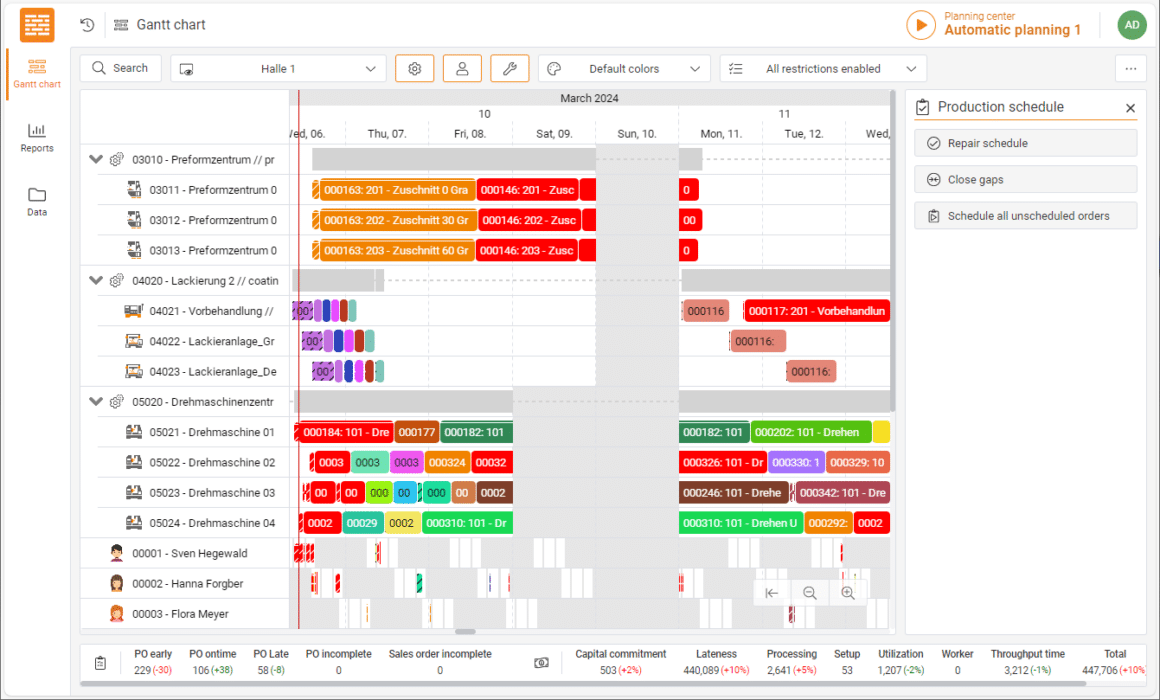
- Control Centre: A clear view of operations: This tool is a complex report and provides a Gantt chart visualisation of processes and orders displayed as time intervals. It allows users to view production planning and scheduling from various perspectives, by machine, by production area, or even by individual production order (showing total throughput time across all resources). In addition, modern control centres enable colour-coding of bar charts based on specific aspects such as same colours for same materials, order specifications, workstations or employees. This allows users to define custom colour assignments and filters to easily identify items such as orders for a specific customer.

GANTTPLAN Web: Production Scheduling Software with clear visualisation of the Control Center User experience & configurability: Making scheduling fun and functional
In today’s fast-paced production environment, Scheduling Software needs to be both powerful and enjoyable to use. A modern user interface with a flat design, drag-and-drop functionality, and clear visuals simplifies complex planning and scheduling tasks. This user-friendly approach encourages active use of the software and reduces onboarding and training time.
Web advantages: Mobile Access and Real-Time Collaboration
Web-based Production Scheduling Software offers faster display, easier navigation, and control centre access on mobile device compared to desktop applications. In addition, graphical reports within the control centre allow for easy identification of capacity utilization and bottlenecks through simple mouseovers.
This web-based approach, with a service-oriented architecture ensures that everyone involved has access to the same, up-to-date information. Digitalized and automated processes not only streamline planning and scheduling but also increase transparency. People can exchange information instantly in response to changing conditions, facilitating more robust and forward-looking planning. This fosters genuine collaboration within production planning and scheduling.
Customisation for individual needs
Modern Scheduling Software should offer extensive configuration options to tailor it to a company’s specific needs. This includes:
- Detailed user administration
- Interface definitions with other systems
- Tailoring planning and scheduling behavior to business processes
- Creating individual dashboards and reports
By prioritising a user-friendly experience and offering customisation options, Production Scheduling Software empowers teams to work more efficiently and collaboratively.
In conclusion: Powerful scheduling for a competitive edge
Production Scheduling Software empowers businesses to tackle today’s demanding production environment. It optimises resource allocation, improves scheduling accuracy, and ultimately boosts productivity. Automation and integration of various functions streamline production processes, keeping companies competitive. However, to achieve the best possible results, careful analysis of a company’s unique needs is essential to selecting the right software solution.